

Forms
Gamification
Social
Education
- How to create course on Softbook
- Setting up a course
- Filling a lesson with content
- Creating homework
- Creating testing
- Changing the order of blocks in the lesson
- Creating a module
- Adding students
- Adding students using API
- Student groups
- Homeworks
- Certificates
- Plans
- Announcements
- Schedules
- Feedback
- Accesses
- Video protection
- Content protection
Comments
CRM
Events
Sales
Tickets
Settings
- General settings
- Domain Settings
- Email Settings
- Dashboards
- Webhooks
- Custom fields
- API
- Branding
- Notifications
Analytics
My team
Softbook Store
Feed
18.05.2023
The Feed is a section of the platform where all school users’ posts are displayed in chronological order. It allows you to keep track of news, user activity, and important events within the school.
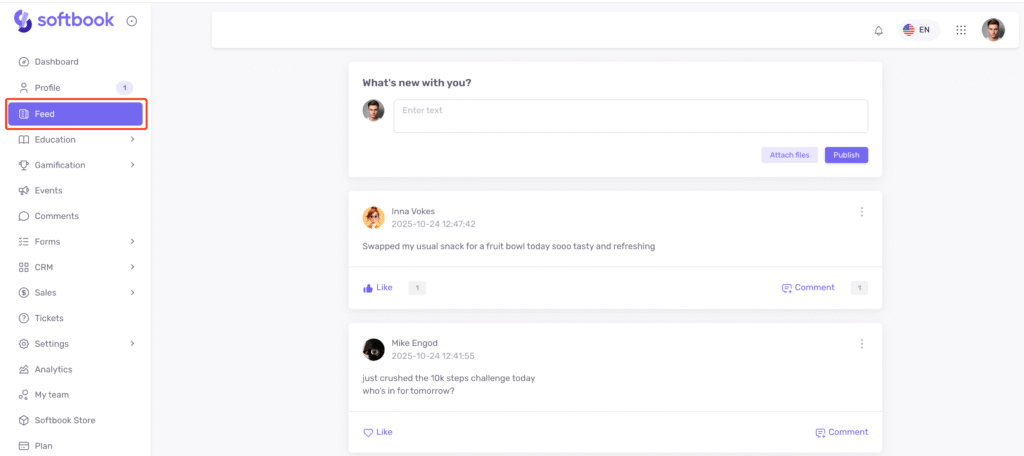
In the feed, you can:
- View posts from all users;
- Create your own posts and attach images or files;
- Comment on and react to posts from other users;
- Edit or delete posts.
The feed and profiles are interconnected: posts made in a user’s profile automatically appear in the feed, and posts from the feed are also visible in the authors’ profiles.
To enable the feed, go to “Settings” → “General Settings” → “Social” and activate the “Enable general news feed” option.
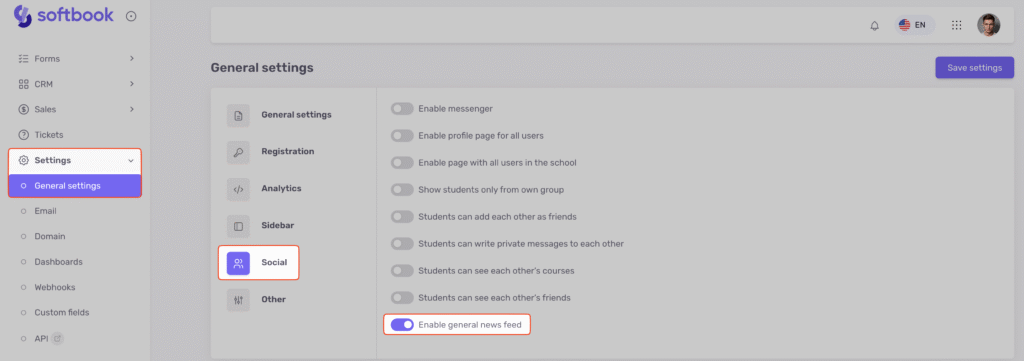
After saving changes, all users will see the “Feed” section in the sidebar.




 Book a demo call right now!