

Forms
Gamification
Social
Automations
Marketing
Knowledgebase
Education
- Mobile app for the school team
- Creating a course with AI
- How to create course on Softbook
- Setting up a course
- Filling a lesson with content
- Creating homework
- Creating testing
- Changing the order of blocks in the lesson
- Creating a module
- Adding students
- Adding students using API
- Student groups
- Homeworks
- Certificates
- Plans
- Announcements
- Schedules
- Feedback
- Accesses
- Comments
- Video protection
- Content protection
CRM
Webinars
Sales
Tickets
Settings
- General settings
- Domain Settings
- Email Settings
- Dashboards
- Webhooks
- Custom fields
- API
- Branding
- Notifications
- AI Connector
Analytics
- Mobile app for the school team
- Overview
- Education
- CRM
- Sales
- Team Actions
- Course Analytics
- Lesson Analytics
- Testing statistics
My team
Softbook Store
Overview
27.04.2023
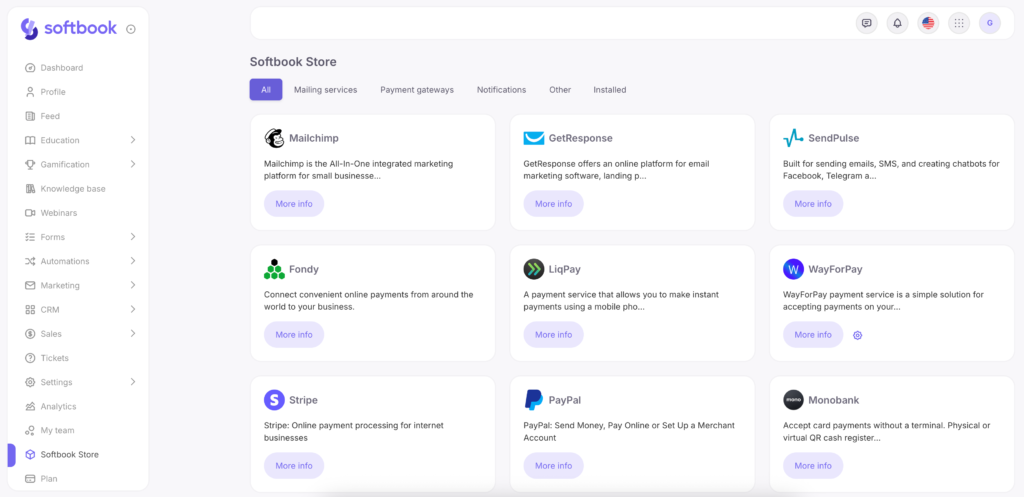
In the list of sections available in your online school, there is Softbook Store. It contains various third-party integrations, including:
- Email services
- Payment systems
- Notifications
- Others
All of them are organized into their respective categories.
Integrations that do not fit into any of the main categories are placed under the “Others” category. Services and integrations that are already connected to your online school can be found under the “Installed” category.



 Book a demo call right now!