

Plan
Email campaigns in Softbook LMS work through a limit system. The number of available emails depends on your school’s plan and any additional email packages you purchase separately.
These limits are used for:
- marketing email campaigns;
- automated email sequences;
- emails sent through automations.
The section is located in the side menu: Marketing → Plan.
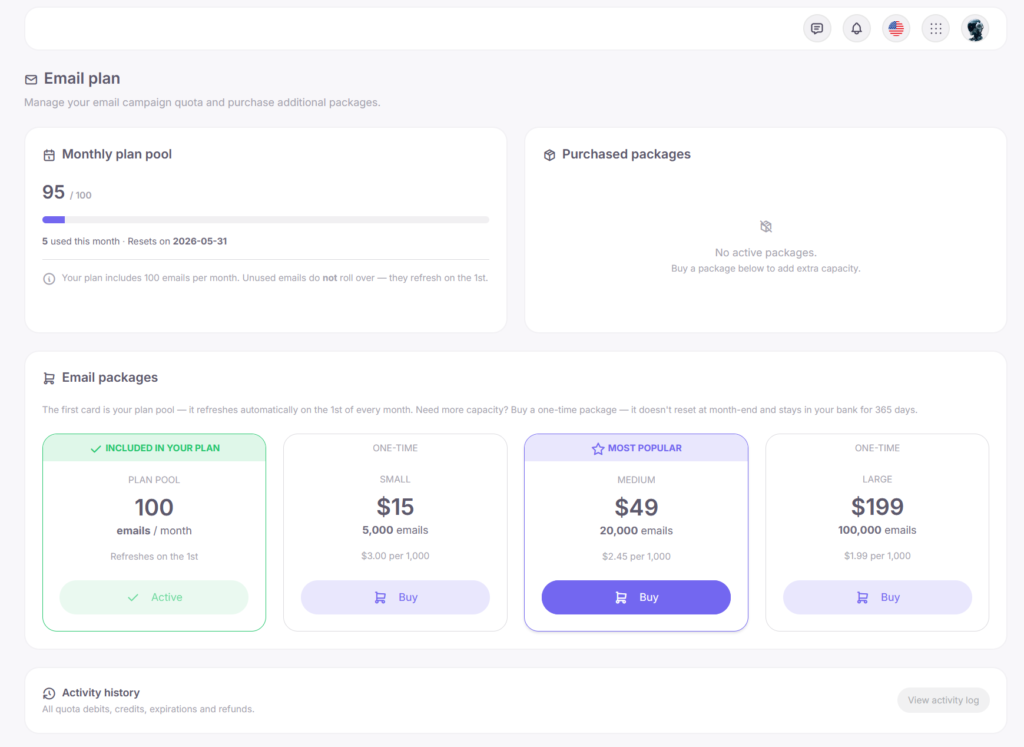
Your email balance consists of two parts:
- a monthly limit included in your plan;
- additional email packages.
The monthly limit renews automatically every month. Unused emails are not carried over to the next period.
Additional packages can be purchased at any time. They remain active for 365 days from the purchase date and do not depend on the monthly limit.
Number of Emails Included in the Plan
The number of available emails depends on your school’s plan.
| Plan | Emails per month |
| Trial | 50 |
| Mini | 0 |
| Pro | 2 000 |
| Max | 5 000 |
Your current limit is always displayed in Marketing → Plan.
Email Packages
If the monthly limit is not enough, you can purchase additional email packages.
Available options:
| Package | Number of emails | Validity period |
| Small | 5,000 | 365 days |
| Medium | 20,000 | 365 days |
| Large | 100,000 | 365 days |
You can use multiple packages at the same time. Softbook automatically distributes email usage between them.
Which Emails Use the Limit
The following emails count toward the limit:
- email campaigns from Marketing → Campaigns;
- automated email sequences;
- emails sent through automations.
The following do not count toward the limit:
- system emails;
- course access emails;
- password recovery emails;
- notifications;
- staff invitations;
- test emails.
Softbook system emails are sent regardless of your remaining limit.
How Email Usage Works
Each email sent to one recipient counts as one email from your balance.
For example:
- a campaign sent to 100 students = 100 emails;
- a campaign sent to 5,000 students = 5,000 emails.
Before starting a campaign, Softbook checks whether you have enough emails available for the entire audience. If there are not enough emails, the system will immediately show how many additional emails are required.
Emails are used in the following order:
- The monthly limit is used first.
- After that, additional packages are used.
- If several packages are active, the package with the nearest expiration date is used first.
Monthly Limit Renewal
The monthly limit renews on the first day of each month.
When the renewal happens:
- the limit is restored according to your plan;
- unused emails expire;
- additional packages remain active.
Packages continue working until all emails are used or the package expires.
Where to Check Your Remaining Emails
In Marketing → Plan, you can see:
- the number of available emails;
- the amount already used;
- the next renewal date;
- the list of active packages;
- the expiration date of each package;
- the history of usage and purchases.
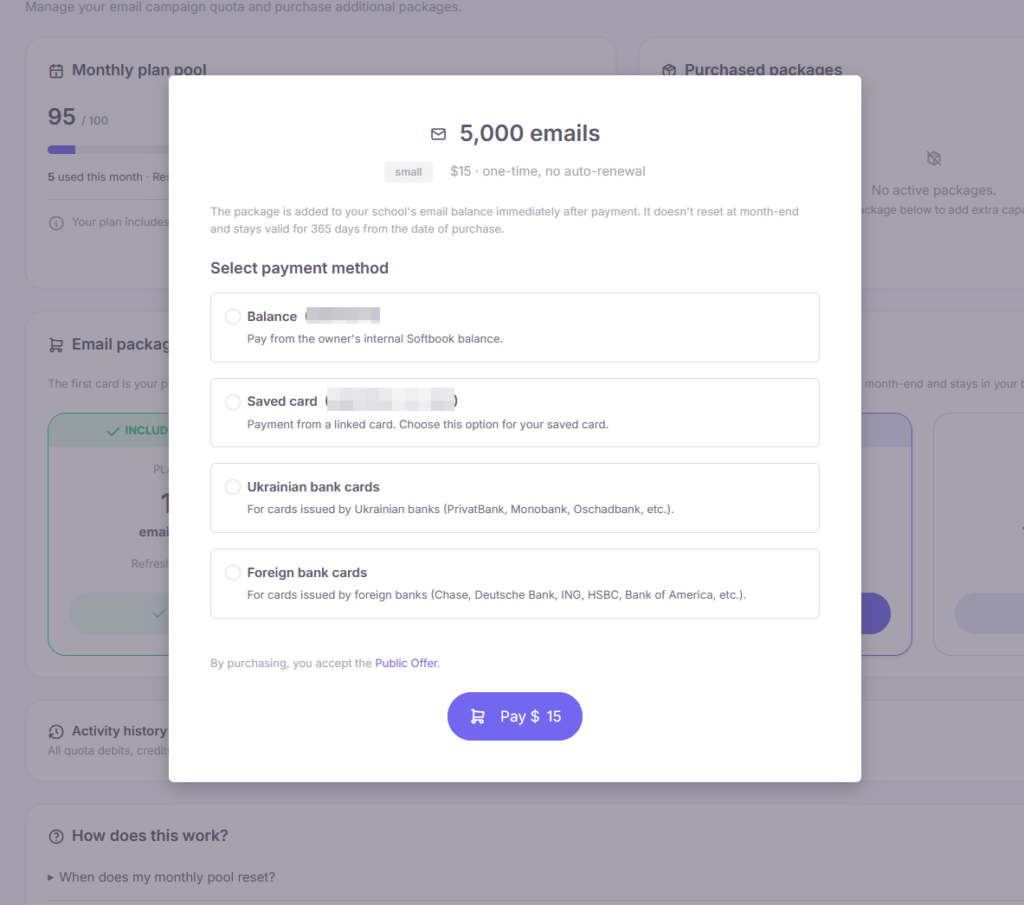
Purchasing an Email Package
To purchase a package:
- Open Marketing → Plan.
- Select the package you need.
- Click Buy.
- Choose a payment method.
After payment, the package becomes available immediately.
What Happens If You Run Out of Emails
If there are not enough emails before the campaign starts, Softbook will prevent the campaign from being launched and show how many emails are missing.
If the limit runs out during an active campaign:
- already sent emails remain delivered;
- the remaining part of the campaign is paused;
- sending continues automatically after purchasing a new package.
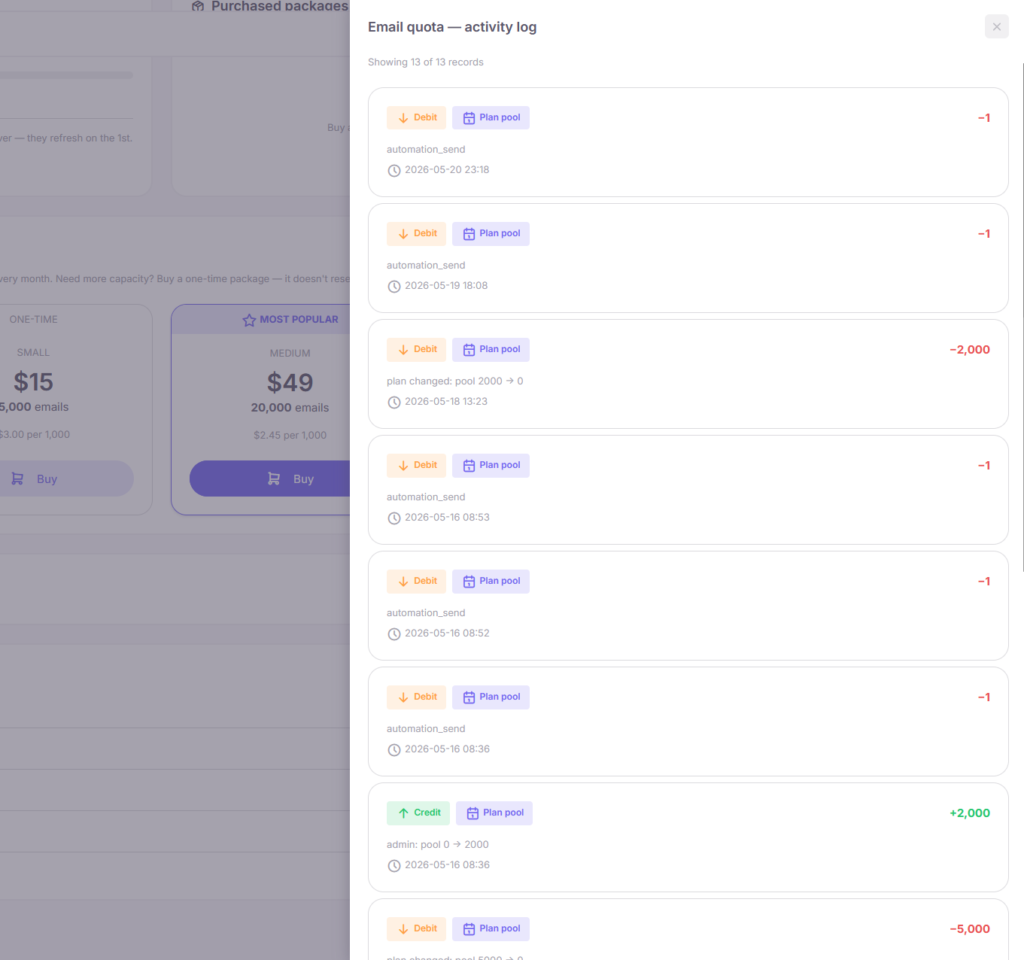
Activity Log
The Marketing → Plan section includes an activity log.
The log displays:
- monthly limit renewals;
- package purchases;
- email usage;
- package expiration dates.
This helps you track how your email balance is being used.
Plan Changes
When you change your plan, email limits are updated automatically.
If the school upgrades to a higher plan:
- the monthly limit increases;
- already used emails remain in the statistics.
If the school downgrades to a lower plan:
- the monthly limit decreases;
- if the new limit has already been exceeded, email sending will be unavailable until the next renewal or package purchase.
Test Emails
Test email sends do not use your email limit.
The following rules apply to test emails:
- the subject automatically includes the [TEST] label;
- only school staff members can send test emails.
Usage Examples
Example 1. Regular Usage on the Pro Plan
- The Pro plan includes 2,000 emails per month;
- An email campaign to 1,200 students will reduce the balance to 800;
- The next campaign to 700 students will leave 100 emails.
If you try to send 500 more emails after that, the system will prompt you to purchase an additional package.
Example 2. Using an Additional Package
- Pro plan = 2,000 emails;
- An additional package of 5,000 emails is purchased;
- Total available volume = 7,000 emails.
The monthly limit is used first, then emails from the package.
Example 3. Unused Monthly Limit
If no campaigns were sent during the month:
- the unused monthly balance expires;
- on the first day of the next month, a new limit becomes available according to the plan.
Example 4. Large One-Time Campaign
If you need to send an email to 30,000 recipients:
- the monthly limit is used first;
- the remaining amount is covered by email packages.
Softbook automatically distributes usage between available packages.
Recommendations
- Plan large campaigns in advance.
- Monitor package expiration dates.
- Always send a test email before launching a mass campaign.
- Remember that automated email sequences also use the shared email balance.
- If you regularly send large volumes of emails, larger packages are usually more efficient.
If you have questions about email limits or choosing a package, contact the support team.



 Book a demo call right now!